No install
Open Pikachu Volleyball online in your browser instead of hunting for old executable files.
Free browser game
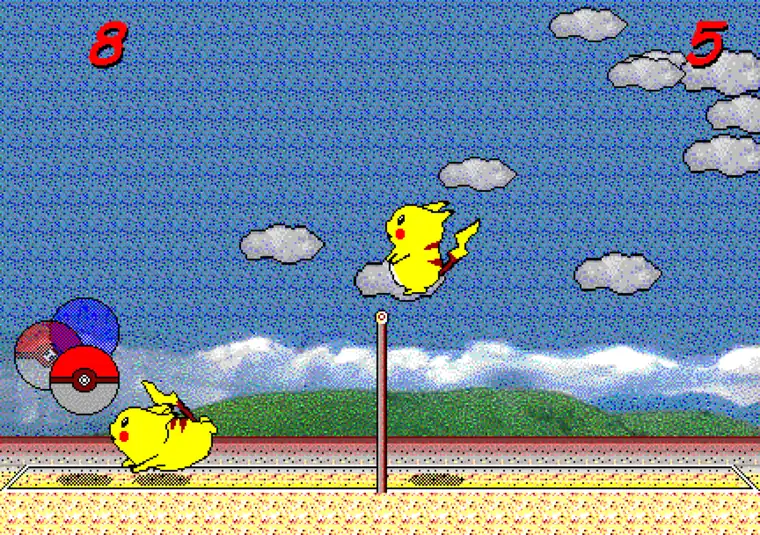
Play Pikachu Volleyball directly in your browser. This English page keeps the game first, then explains controls, mobile setup, online versions, and AI edition notes without hiding the playable area behind long copy.
The embedded game auto-loads into the title screen. A desktop keyboard is recommended; mobile devices work best with a Bluetooth keyboard.
Quick start
Open Pikachu Volleyball online in your browser instead of hunting for old executable files.
The game depends on directional keys, Z, Enter, F, V, and timing.
The page opens on mobile, but a Bluetooth keyboard makes Pikachu Volleyball much easier to play.
Understand the difference between the basic browser version, P2P online version, and Super AI edition.
Controls
Pikachu Volleyball looks simple, but the best rallies come from timing your jump, reading the ball arc, and choosing the correct side from the menu.
The controls page explains one-player mode, two-player mode, practice mode, the extra V key, and the Esc menu shortcut.
Read the controls guide| Move | Use the assigned direction keys to move and jump. |
|---|---|
| Select | Use Z or Enter to choose menu options. |
| Attack | Combine jump timing with direction input. |
| Menu | Use Esc to hide or show the game menu bar. |
Mobile
Many players search for Pikachu Volleyball mobile because they want the old school game on a phone or tablet. The game page can open on mobile browsers.
For real play, connect a Bluetooth keyboard and rotate your screen horizontally. The mobile page explains the setup.
See mobile tipsVersions
Play the standard Pikachu Volleyball online game directly on this page.
Play on the homepageFor network matches, read the online version explanation before leaving this site.
Online guideFor stronger computer opponents, read how the AI edition differs from the basic game.
AI guidePikachu Volleyball has a very direct search intent: most visitors want to play the game first. That is why this homepage places the playable browser game above the longer guide sections. The supporting content then answers the next questions players usually have: how the controls work, whether mobile play is possible, how the online version differs, and what the AI edition means.
The game is keyboard-first. Desktop players usually get the best experience, while mobile players should connect a Bluetooth keyboard and use landscape orientation. The controls page covers menu selection, one-player mode, two-player mode, the extra V key, practice mode, and the Esc shortcut.
This site also separates the basic browser version from related projects such as the P2P online version and Super AI edition. That keeps the homepage useful for play intent while still helping users who search for Pikachu Volleyball online, Pikachu Volleyball mobile, or Pikachu Volleyball AI.
The fastest way to enjoy Pikachu Volleyball is to use the embedded game area on the homepage. The title screen appears inside the iframe, and the player only needs to click the game once when keyboard focus is required. There is no separate play page to find and no extra start gate before the actual game screen. This is important because people who search for Pikachu Volleyball online usually want immediate access, not a long introduction before they can serve the ball.
A safe Pikachu Volleyball page should also avoid pushing unofficial downloads or unclear executable files. This site keeps the core play experience in the browser and uses separate guide pages for related topics such as controls, mobile play, P2P online play, and the Super AI edition. Players can start with the browser game, then move to the detailed guides only when they need practical help.
From an SEO perspective, this structure matches the real search intent behind Pikachu Volleyball. The H1, title, description, game block, controls section, FAQ, and long-form guide copy all reinforce the same topic while answering different user needs. Close variants such as Pikachu Volleyball online, Pikachu Volleyball controls, Pikachu Volleyball mobile, and Pikachu Volleyball AI appear naturally in sections where they help players make a decision or solve a problem.
The homepage is also built to support future expansion without exposing unfinished pages. Navigation can point users back to the default language for guides that are not yet translated, while the language switcher and hreflang data stay focused on pages that really have localized content. That keeps Pikachu Volleyball Online useful for human players and clean for search engines.
Future language versions can keep the same structure but should localize the actual keyword target. Korean uses 피카츄배구, while English users search for Pikachu Volleyball online. Spanish, French, German, Portuguese, Italian, and Japanese pages need their own natural title, description, H1, FAQ, and internal links because each market searches for the same browser game in a slightly different way.
FAQ
Yes. Use the game area on this page to play Pikachu Volleyball in your browser.
No. This site uses a browser version, so you do not need an old executable file.
The page opens on mobile, but the game is much better with a Bluetooth keyboard.
The homepage shows a short control table, and the controls page explains the details.
This site provides the basic game and explains the Super AI edition as a related project.
No. This is an independent fan site and play hub.
No. This site is a fan-made information and play hub, and it is not affiliated with Nintendo, The Pokemon Company, the original creator, or the JavaScript port maintainer.