- Fastest route
- Browser game with no installer
- Best for two
- Local keyboard or controller support
- Mobile check
- Landscape layout and touch/input fit
- Before installing
- Verify the current official listing
Quick answer: which online volleyball game route fits?
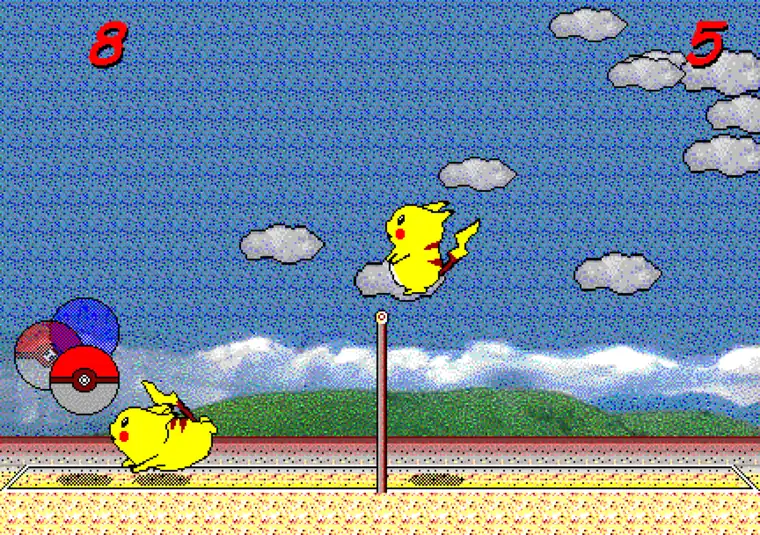
If you want to play immediately, start with a browser game that loads in the page and explains its controls clearly. Pikachu Volleyball is a useful example: it is a compact one-on-one match, the rally starts quickly, and the homepage keeps the playable game near the top. That is a different promise from a PC sports title that needs a store install or a mobile game that expects a touch-first layout.
If you want to play with another person, check the player arrangement before the graphics. Same-room play may use one keyboard or a shared screen; remote play may require a separate network project or an account-based room. If you want simulation depth, career systems, or teams, accept that the match will feel less like a five-minute browser session. The right choice is the one that matches your reason for searching, not the one with the most results.
The practical order is simple: choose browser, local two-player, mobile, or full PC intent; verify the platform and controls; then open the official game page. Do not treat a generic list, an old video, or a search snippet as proof that a game still supports a feature.
- Want instant play? Choose a browser-first game.
- Want a friend beside you? Check local multiplayer and simultaneous input.
- Want phone play? Check landscape layout, touch controls, and browser support.
- Want a larger sports game? Verify the current PC or console listing.

Start with the browser route when setup matters most
Browser volleyball games are the best fit when the searcher wants a short match without an installer. Look for a page that loads the game directly, states the keyboard or touch requirements, and gives the user a way to restore focus when keys stop responding. A browser route also makes it easier to try a game before deciding whether a larger download or purchase is worthwhile.
The trade-off is that browser games vary widely in quality and persistence. Some are small arcade experiments, some are physics toys, and some are pages that only lead to another platform. Check whether the game is actually playable in the current page, whether the controls are visible, whether the audio or fullscreen behavior is explained, and whether the page identifies the source honestly.
For the Pikachu Volleyball route, the homepage is the direct play page. The separate online guide explains the difference between the basic browser game and the related P2P project, while the controls guide handles keyboard focus and two-player setup. Keeping those jobs separate prevents a broad online-game query from turning into a confusing version claim.
- Playable content should appear before a long promotional description.
- Controls and focus instructions should be visible in normal HTML text.
- A browser game should not require an unknown executable just to start.
- Use the official project or platform page for current availability.

Two-player online volleyball games need a setup check
The phrase two-player volleyball games can describe three different arrangements: two people sharing one keyboard, two controllers on one screen, or two players connecting remotely. Those arrangements are not interchangeable. A game can be listed as online but still be single-player, or it can support multiplayer only through a separate mode that is not available in the browser version.
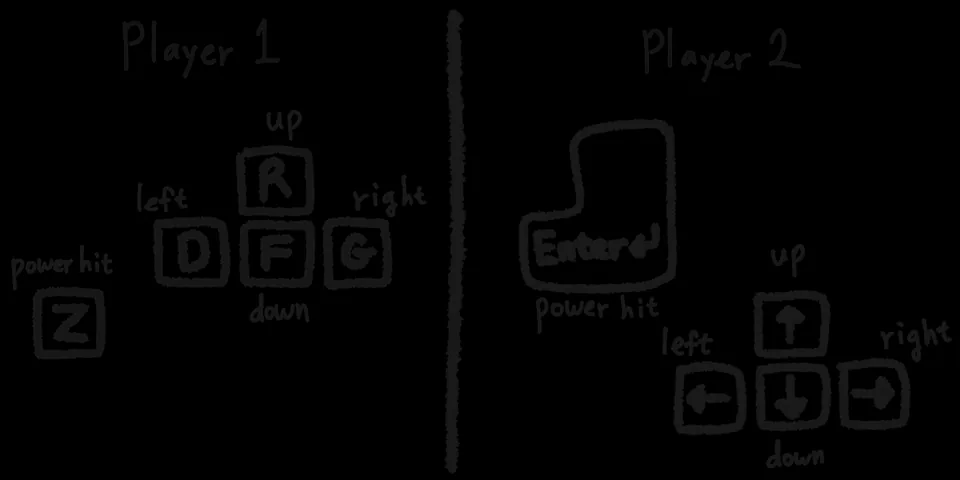
For same-room play, check whether both players can press movement and jump keys at the same time. Keyboard rollover, browser focus, and a cramped layout can matter more than the game's advertised player count. Agree on the target score, rematch rule, and whether a focus loss causes a replay before the match becomes competitive.
For remote play, read the network requirements and use the official project route. Do not assume that a local two-player browser game automatically creates a remote room. On this site, the multiplayer guide is the better next step when the real question is shared-keyboard preparation versus P2P play.
| What you want | Look for | Common mistake |
|---|---|---|
| Same-room match | Local multiplayer, shared screen, keyboard or controller support | Assuming an online label means remote play |
| Remote match | Network room, connection instructions, supported browsers or accounts | Expecting the basic browser page to create a room |
| Solo practice | CPU opponent, practice mode, restart or difficulty options | Choosing a multiplayer-only listing |
| Quick party session | Short rounds, simple controls, low setup time | Buying a deep simulation for a five-minute match |
Mobile volleyball games are a different filter
A mobile result is not automatically a good mobile game. Check whether the page is designed for landscape viewing, whether the buttons cover the court, and whether touch controls are precise enough for a timing-heavy rally. Some browser games remain playable on a phone but are much easier with a Bluetooth keyboard or a larger screen.
If you are comparing a mobile game with a keyboard game, compare the input model before the art style. A touch-first game may use large virtual buttons and short sessions, while a keyboard-first game may preserve finer movement but require an external input device. The best option depends on whether you are commuting, playing with a friend, or trying to reproduce a desktop match.
Use the site's mobile guide for device setup and screen-orientation advice. This new page only helps you choose the route; it does not promise that every third-party browser or app listing supports the same controls.
- Check landscape layout and readable court size.
- Check touch-button placement and whether the game accepts external input.
- Do not confuse an app-store listing with a browser game.
- Verify the current official platform page before installing.
PC volleyball games offer more depth, but a different commitment
Searches such as volleyball game PC or volleyball computer games usually signal a larger commitment than an instant browser query. The visitor may want teams, career systems, a simulation camera, controller support, or a conventional store install. That is a legitimate need, but it should be separated from a fan looking for one short Pikachu Volleyball rally.
Before opening a PC listing, check the supported operating system, controller and keyboard input, current store status, system requirements, and whether the game is maintained. An old page or a video can preserve useful context without proving that the current build runs on a modern computer. Prefer an official store or developer page over a random mirror, especially when the page asks for an executable.
The existing PC guide explains how the browser edition works on a desktop and why an unknown old EXE should not be treated as the default route. The alternatives guide is the right place to compare deeper independent volleyball games. This page links to both without merging their search intents.
- Browser route: fastest start and lowest installation risk.
- PC sports route: more modes, but more setup and compatibility checks.
- Store route: verify current price, platform, and player support.
- Unknown download route: do not infer safety or authenticity from the filename.

How to judge an online game list without overpromising
A useful list of volleyball games online should tell you what is known and what must be checked. Separate direct browser play from external links. Label editorial illustrations as illustrations. Keep price, version, platform, and multiplayer claims tied to a source that can change. If the source is a store page, send the reader there for the current product facts instead of freezing an old price in the article.
Also look for information gain beyond a list of names. A searcher benefits from a decision rule: browser for immediate access, local multiplayer for a friend beside you, mobile for touch-first play, and PC or console for a larger sports system. That rule remains useful even when an individual game leaves a platform or changes its access model.
The purpose of this page is therefore not to declare one permanent winner. It narrows the search, sets honest expectations, and sends the reader to the page or official listing that can answer the next question.

A short decision checklist
First, name the job: play now, play with a friend, use a phone, or find a deeper installed game. Second, confirm the input and platform requirements. Third, open the current official page if the route leaves the browser. Fourth, return to the site's focused guide if the remaining problem is controls, mobile setup, online-version meaning, or download safety.
For the fastest no-install test, play the browser version first. If the experience is right but the keys are confusing, read controls. If the screen is small, read mobile. If you want a remote match, read multiplayer and online. If you want a different game rather than the same compact loop, read alternatives.
- Play first when a browser route is available.
- Verify the feature you actually need, especially multiplayer.
- Use official pages for changing store and platform facts.
- Keep brand-specific guides separate from the broad game list.